Running an MCP Server Inside DeepSeek Harness: What the Bridge Carries, and When You Need a Plugin Instead
A disclosure first, because it should change how you read this. We work on ByteBell, which builds a verification layer over a codebase and checks AI written code against it. We had an obvious commercial interest in finding out what the new DeepSeek runtime meant for us. The technical notes below hold regardless of what you make of the product.
The short version
DeepSeek Harness ships an official MCP bridge as a package called @deepseek-ai/dsh-mcp-client.
MCP, the Model Context Protocol, is a standard way for a program to publish a set of tools that any AI agent can call. If you have built one for Cursor or Claude Code, you already have an MCP server.
The bridge works like this. You mount one instance of it for each server you want to connect. It talks to that server, takes the list of tools the server offers, and registers them inside the harness. From then on the model calls them exactly as it calls built in tools. Each one appears under the name mcp__<serverName>__<rawName>, so a tool called search on a server called bytebell becomes mcp__bytebell__search.
We already run an MCP server. We pointed the harness at it and it worked, with nothing written on our side. The usual setup is stdio, which means the harness starts your server as a child process on the same machine and talks to it over standard input and output. Mounting happens in the configuration file rather than in code.
If you have already built an MCP server, you are finished. That is worth stating plainly, because a number of teams are currently writing native plugins for capabilities they had already exposed over a protocol the runtime bridges out of the box.
What the bridge does not carry
Two things caught us out. Both are documented, just not where you look first.
Only tools cross the bridge. MCP servers can also publish Resources, which are pieces of content the agent can read, and Prompts, which are reusable instruction templates. Neither has anything on the harness side to consume it, so anything you exposed as a resource will simply not appear. We had a few things on the resource side and had to expose them again as tools.
Not every kind of result survives. Images do come through properly: PNG, JPEG, WebP and GIF become real image blocks in the model’s context. Audio and embedded resource payloads do not reach the model context at all. If your server returns anything other than plain text, test it rather than assuming.
There is also a startup timeout of 60 seconds, inherited from the MCP software development kit, and a server that stops responding will slow down both startup and shutdown. Worth knowing if your server does expensive work when it boots.
One real advantage of using the bridge instead of writing your own integration is that bridged tools are governed exactly like local ones. They pass through the same tools/pre-execute stage, which is the point where the runtime applies permission checks, timeouts and cancellation. You inherit all of that for free.
Why we decided to write a native plugin anyway
This is the part that decided it for us, and it applies well beyond our product.
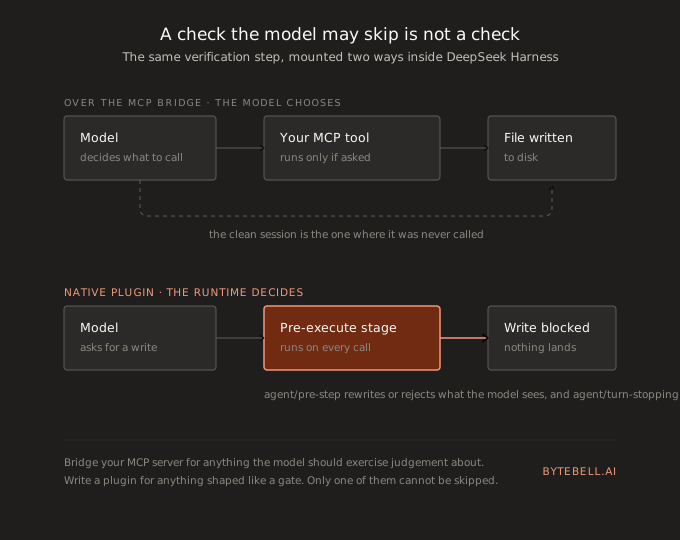
Over MCP, the model chooses whether to call your tool. It reads the description and decides. For a search tool or a database query that is the right design, because you want the model using judgement about when it needs more information.
For a check, that same design does not work. A verification step the model is free to skip is not verification. It is a suggestion. Models do skip steps, particularly when they are confident and particularly when the task looks small. The failure you have to worry about is not the model calling the tool and ignoring the answer. It is the session where the tool was never called at all and everything looked fine.
The native extension points remove the choice. The runtime exposes hooks, which are named points in its own execution where your code gets to run:
tools/pre-executeruns before any tool call and can block it.agent/pre-stepdecides what the model is shown before each step, and lets your code rewrite or reject those messages outright.agent/turn-stoppingcan end a turn entirely.
Sitting on those hooks means a file write that breaks a contract gets stopped before it lands, whether or not the model thought to consult anything. That is the difference between telling somebody afterwards that they wrote the wrong thing and the wrong thing never reaching the disk.
The general rule: if your tool supplies information, MCP is the right home for it and you are already done. If your tool is a gate, meaning something that must run every time and must be able to say no, it has to be a plugin. That covers policy enforcement, secret scanning and compliance checks as much as it covers verification.
Where a plugin goes once you have written one
The publishing path took us longer to piece together than it should have, so here it is in full.
Publish the source to a public GitHub repository and add the dsh-plugin topic to it. That topic is how the whole ecosystem is currently being indexed, so a plugin without it is effectively invisible. Then publish the package to npm under your own scope.
Users install through the launcher rather than through npm directly.
dsh plugin --profile web add @yourscope/dsh-plugin-thingA profile is one configured instance of the agent, with its own set of plugins. That command passes everything after it to pnpm inside that profile’s directory, so the ordinary pnpm syntax you already know applies. The plugin installs into the profile’s own dependencies and loads after the bundles that ship with the runtime.
For anyone who cannot reach public npm, which describes most of the enterprises we sell to, a git address works and so does a local folder.
dsh plugin --profile web add link:/absolute/pathShip a tarball as well, which is a single compressed file containing the package, and expect the customer’s platform team to copy it into whatever internal package registry they run. Profiles that have been running a long time sometimes need a restart after an install, and anything that changes Node code always does.
What to think about before shipping into an enterprise
A plugin can change which tools are allowed, change the system prompt, and mount itself into the interface. This is a much wider trust boundary than a browser extension, and it should not be treated like one. Anything you mount can reach every file the agent can reach. Read the source of what you install.
There is also a procurement point that has nothing to do with engineering quality. If you sell to banks, defence or government, the country a dependency comes from appears in the security review no matter what the licence says. Copying a design pattern raises no such question, because a pattern is not a dependency. This is not a criticism of the code, which is good. It is a practical fact that will slow a deal down, and it is better to know before you build on it.
The honest limitation
We would not put a foundation on this yet. It is a developer preview, the authors say changes that break compatibility are coming, and the npm tagging is inconsistent enough today that you can install a stale pre release by hand and never be told.
Our plan is about two weeks of work, split between documenting the MCP path that already works and building a thin native plugin for the interception hooks. If the runtime settles, we are already listed. If it does not, we spent two weeks and came away understanding the extension model.
This is what ByteBell builds
The reason a verification hook is worth two weeks is that the thing it verifies against has to exist first, and that is the harder half.
ByteBell is the verifiable context layer for code. We run the LLM compiler pattern, which is a one time pass where a model reads every file in your repositories and lowers it into a verifiable code IR capturing purpose, business context and cross repository relationships, with the file and the line kept on every claim. You pay that compile cost once, on your own infrastructure through Docker, and your source never leaves your environment. At open source model pricing it works out to about $13 per 1,000 files.
After that, every engineer on any copilot queries the same representation through a single MCP url, which is why the runtime question above is a matter of preference rather than a dependency. Instead of re-reading thousands of files, agents get the relevant intent alongside the code. Because the representation is verifiable, an agent edit gets checked against it before it lands, using per file SHA-256 diffing so only what actually changed is examined again. Across 46 Kubernetes ecosystem repositories and 150,000 files we measured about 10% higher accuracy at 70% lower cost, on roughly a fifth of the tokens.
A hook decides whether a change is allowed through. The context layer is what tells it the answer.