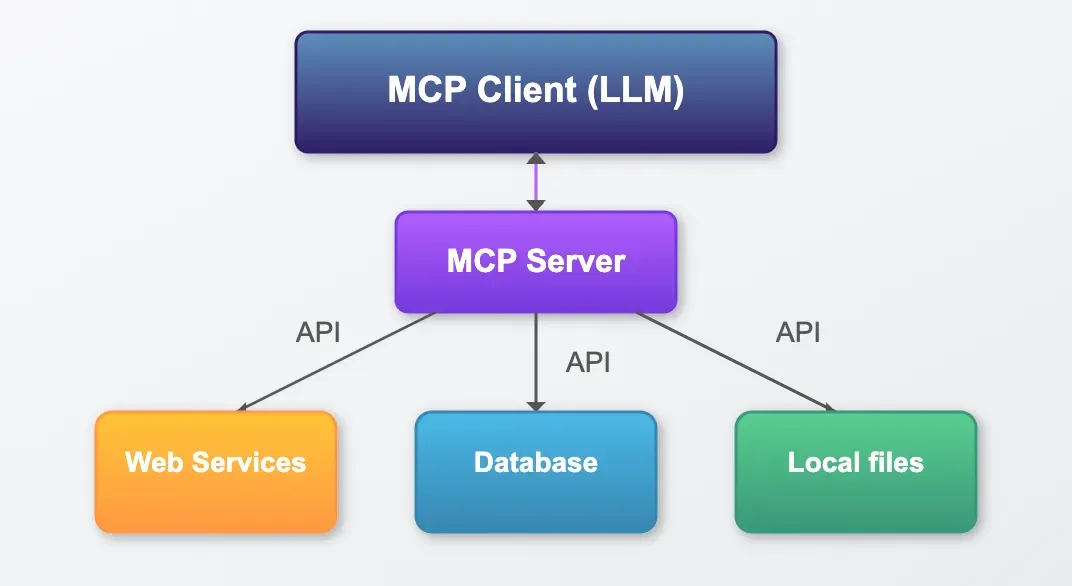
1 Real-Time Data Fetch & Freshness
RAG Alone vs. MCP + RAG:
- RAG excels at retrieving static content (e.g., docs, research papers, archived forum threads) from a vector database.
- MCP adds live context (e.g., current open issues on GitHub, the latest pipeline build status, social media mentions).
“Show me the latest failing CI tests for feature/xyz branch and open an issue?”This ensures developers get both historical context and live updates in one place.
1.1 Action-Oriented Developer Workflows
Without MCP: Developer Copilot can direct a user to documentation, forum posts, or GitHub issues but cannot perform any operations.
With MCP: The Copilot can call an MCP server to:
- Open a Pull Request: Provide a code diff, fork the repo, and create a PR on GitHub.
- File a Bug Report: Gather logs, error messages, and metadata, and call a Jira MCP to create an issue.
- Update API Documentation: Use a Confluence MCP to append new code snippets or version notes.
Benefit: Developers experience an end-to-end workflow—ask, retrieve, and act—without leaving the Copilot interface.
1.2 Unified Interface for Diverse Sources
Multiple Data Sources:
- Docs MCP: Reads the latest Markdown or HTML-based API docs.
- GitHub MCP: Fetches repository metadata, allows code operations (push, PR, issue creation).
- Forum MCP: Queries support threads on platforms like Stack Overflow or Discord.
- Research Paper MCP: Retrieves PDFs or structured abstracts from academic archives.
- Image MCP: Pulls architecture diagrams or UI mockups from a media store.
{
  "name": "github:get_open_issues",
  "arguments": { "repo": "my-org/my-repo", "labels": ["bug", "help wanted"] }
}
- Benefit: Developers can spend more time solving problems and less time writing integration code.
2. Setting Up MCP Servers for Developer Use Cases
To integrate MCP servers into your Developer Copilot, follow these steps:
2.1 Identify Core Services & Actions
Documentation Service: Expose a Docs MCP that can:
Fetch a specific API endpoint’s documentation page.
Search within docs for a keyword.
Return last-modified timestamp.
Code Repository Service: Build a GitHub MCP to:
List open issues or PRs.
Create, update, or merge pull requests.
Fetch code snippets or file contents.
Issue Tracker Service: Develop a Jira (or GitHub Issues) MCP to:
Create a ticket with title, description, and attachments.
Transition issue statuses (e.g., “To Do” → “In Progress”).
Fetch issue comments or labels.
Forum & Community Service: Implement a Forum MCP for:
Searching threads by tags or keywords.
Retrieving the top answers or comments.
Posting replies on behalf of the Copilot (with user approval).
CI/CD Service: Create a CI MCP to:
Query the status of the latest build pipeline.
Download build logs or test reports.
Rerun tests or trigger deployments.
2.2 Choose Your MCP Transport & Hosting Strategy
Transport Protocols:
HTTP + SSE (Server-Sent Events): Good for streaming incremental updates (e.g., live build logs).
WebSockets: Preferred for bi-directional, low-latency interactions—ideal when the Copilot and MCP server need continuous back-and-forth messaging.
Plain HTTP/REST Mode: Available in MCP spec v1.1+ for simple request/response patterns. Choose this for stateless, high-throughput calls (e.g., fetching doc pages).
Hosting Options:
Local Deployment: MCP servers run on developer machines (useful for internal Developer testing).
Containerized Deployment: Package each MCP server as a Docker image. Deploy behind a Kubernetes cluster or managed container service for scalability.
Managed MCP Hosting: Services like mcp.run or Anthropic MCP Host offer one-click MCP hosting, reducing DevEx friction.
2.3 Configure Authentication & Permissions
Security is paramount when your Developer Copilot can perform write operations. Follow these guidelines:
OAuth 2.1 Integration:
Client-Side Flow: The Copilot (or user’s browser) goes through an OAuth consent flow, granting the MCP server specific scopes (e.g.,
“repo:read”,“repo:write”).JWT-Based Session Tokens: After OAuth, the MCP server issues a short-lived JWT tied to the user’s identity. All subsequent MCP calls must present this JWT.
Fine-Grained Scopes & Least Privilege:
Docs MCP: Scope docs:read-only.
GitHub MCP: Scopes repo:read, repo:write, issues:read, issues:write. Avoid granting “admin” scope unless absolutely necessary.
Jira MCP: Scopes jira:project-read, jira:issue-create.
Session Management:
Bind each session ID to a unique JWT. Ensure that only the token owner’s data is accessible.
Use a shared cache or database (e.g., Redis) to manage active sessions for horizontal scaling.
Token Rotation & Revocation:
Set JWT expiration to a short interval (e.g., 15–30 minutes).
Provide a revocation endpoint to immediately terminate compromised tokens.
3. Security Best Practices for MCP-Enabled Developer Copilots
Integrating MCP introduces new attack surfaces. Here’s how to mitigate risks:
3.1 Preventing Prompt Injection & Unintended Actions
Strict Command Whitelisting: Only allow the AI Copilot to call predefined MCP methods (e.g.,
"github:create_pr","jira:create_issue").User Approval Workflows:
Copilot proposes an action (e.g., “I am about to open a PR with these changes. Do you approve?”).
User clicks “Approve” or “Reject.”
Only upon approval does the Copilot call the MCP method.
Action Confirmation Logs: Maintain an immutable audit log: who approved, when, and what payload was executed.
3.2 Securing MCP Servers & Tokens
HTTPS & TLS Everywhere: All MCP endpoints must use HTTPS with TLS 1.2+. Disable insecure ciphers.
Token Scope Enforcement: On the MCP server, validate that each JWT’s scopes match the requested action. If a JWT has only repo:read, reject attempts to create a PR.
Rate Limiting & Throttling:
Set sensible rate limits on MCP servers (e.g., 100 calls per minute per user).
Implement exponential backoff on the client side if rate limits are exceeded.
Input Sanitization: Carefully validate all parameters—especially free-text fields (e.g., issue description)—to avoid injection attacks.
Third-Party MCP Vetting: If using community MCP servers (e.g., from an MCP registry):
Check digital signatures; verify the publisher.
Execute untrusted MCP servers in sandboxed environments (e.g., gVisor, Firecracker).
Conduct periodic security audits.
3.3 Monitoring & Alerting
Centralized Logging: Ship MCP server logs (access logs, error logs, audit logs) to a centralized SIEM (e.g., Splunk, Elastic).
Anomaly Detection: Set alerts for suspicious patterns—e.g., a sudden spike in “create_issue” calls or repeated OAuth token failures.
User Notifications: Notify users in-app or via email if their tokens show anomalous activity (e.g., attempts to call MCP methods they didn’t issue).
4. Integration Patterns: Combining RAG and MCP in a Developer Copilot
Designing a seamless RAG + MCP experience involves several architectural patterns:
4.1 Trigger Rules for Real-Time vs. Cached Content
Use Case Example: “Show me the latest version of API X.”
Decision Logic:
If the requested doc was updated within the last 24 hours, use the Docs MCP to fetch the freshest HTML/Markdown.
Otherwise, fall back to the RAG pipeline (embedding-based) for speed and lower cost.
Implementation:
Check Metadata: Store last_modified timestamps alongside each vector embedding.
Conditional Fetch: If current_time – last_modified < 24h, call
docs-mcp:get_page(repo, path); else, run search_embeddings(query).
4.2 Workflow Chaining (Multi-Step Actions)
Use Case Example: “Identify all open bugs labeled ‘high-priority,’ then create a summary issue in Jira.”
Step 1 (RAG): Use RAG to fetch the list of open bugs from documentation or a static bug registry (if such a list exists in your knowledge base).
Step 2 (MCP): Call github:get_open_issues(repo, labels=[“bug”, “high-priority”]).
Step 3 (MCP): Aggregate results and call
jira:create_issue(project="DEVeloper", summary="High-Priority Bugs", description=).
Implementation Tip: Manage session context so that the Copilot retains state between steps, passing relevant variables (e.g., list of issue IDs) downstream.
4.3 Delegated Human-in-the-Loop Approvals
Use Case Example: “Automatically merge pull requests that pass all tests and have 2 approvals.”
Step 1 (MCP): Call
ci:get_latest_ci_status(build_id). If tests passed, proceed.Step 2 (MCP): Call
github:get_pr_reviews(pr_id). Check for at least two “approved” reviews.Step 3 (Human Confirmation): Prompt user: “PR #1234 has passed tests and has two approvals. Merge now?”
Step 4 (MCP): Upon confirmation, call
github:merge_pr(pr_id).
Benefit: Balances automation with human oversight—critical for high-stakes Developer tasks (e.g., releasing major documentation updates).
5. Current Pain Points & What Everyone Is Working to Solve
5.1 MCP Server Discovery & Packaging
Pain Point: No centralized “MCP Marketplace” for discovering vetted MCP servers (e.g., github-mcp, jira-mcp, forums-mcp).
Industry Effort:
Emerging Registries: Projects like mcp.run and Glama’s MCP Hub aim to catalog popular MCP servers with user ratings and version histories.
Official MCP Package Index: In the works—an npm/PyPI–style registry specifically for MCP servers. Each package lists metadata (publisher, version, supported scopes).
5.2 Simplifying Onboarding for Non-Technical Users
Pain Point: Setting up MCP servers currently requires dev skills (Docker, OAuth config, environment variables).
Industry Effort:
Connector Wizards: Developer Copilot platforms are adding graphical wizards to guide users through OAuth consent, scope selection, and one-click MCP server deployment.
Hosted “Developer MCP Suites”: Bund