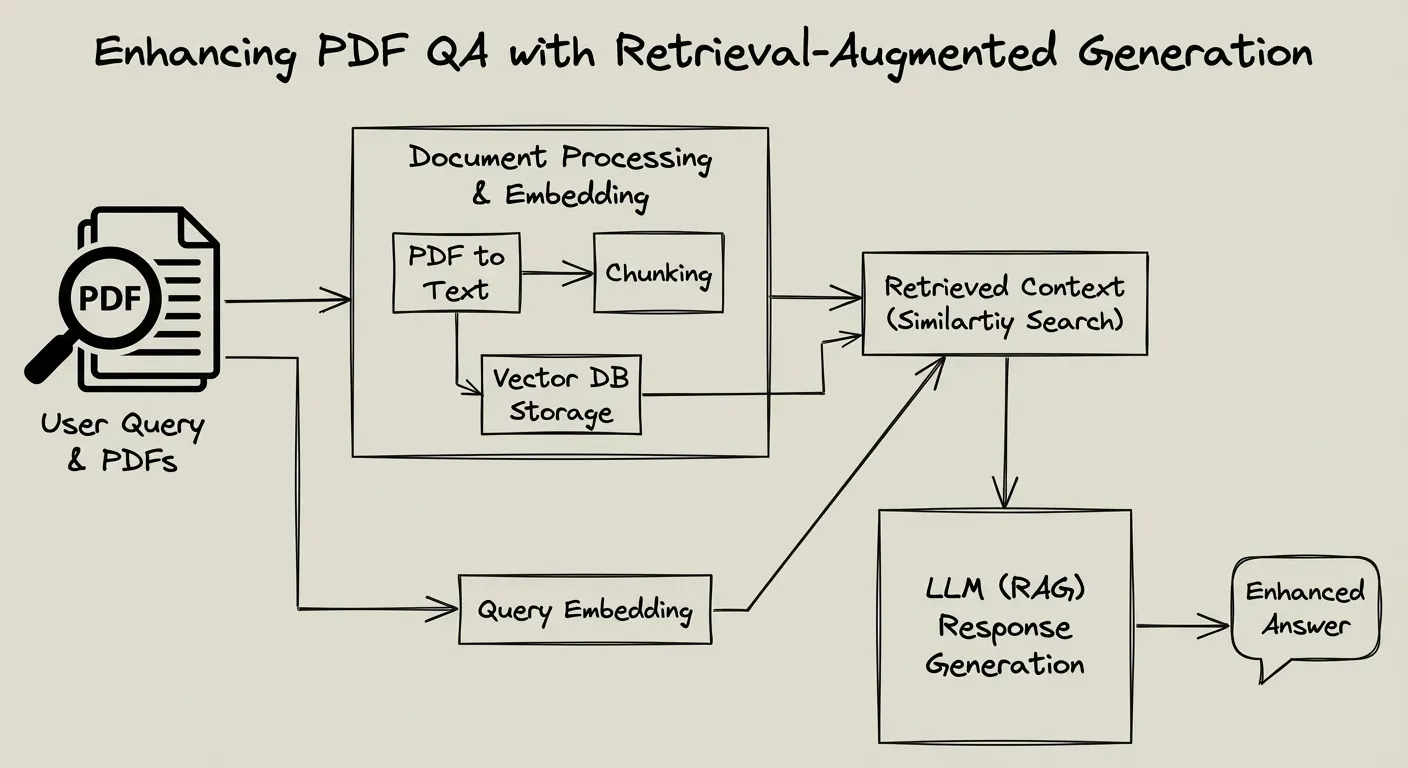
Enhancing PDF QA with Retrieval-Augmented Generation
Challenging Question Types in Technical Document QA
Technical developer documentation can prompt a wide range of user questions – from straightforward look-ups to complex analytical queries. Below we categorize some of the most challenging question types and why they are difficult, with examples for each:
| Question Type | Description & Challenges | Example |
|---|---|---|
| Factual Lookup | Direct questions answered by explicit facts or definitions in the text. These are straightforward if the exact keywords match, but can be challenging if phrased differently (requiring semantic search). The main difficulty is ensuring the relevant snippet is retrieved among large content. | “What is the default timeout value of API X?” – Answerable by finding a specific stated value in the PDF. |
| Inferential/Conceptual | “How” and “Why” questions or those that require understanding concepts and explanations. The answer may not be a single sentence in the text but rather must be inferred from combining multiple statements or understanding the rationale. These questions test the model’s ability to integrate information. | “Why does the document recommend algorithm A over B for data sorting?” – Requires piecing together performance discussion and rationale scattered in the text. |
| Analytical/Comparative | Questions asking for analysis, comparison, or evaluation of information in the document. The document may not explicitly state the answer, so the system must aggregate and compare details from different parts. Without a knowledge graph, the model must retrieve multiple relevant chunks and synthesize them. | “Compare the features of Library Foo vs. Library Bar as described in the PDF.” – Implies gathering mentions of each library and then analyzing differences. |
| Aggregative (“List All …”) | Queries that require listing or collecting multiple items from across the document (e.g. all functions, all limitations, all occurrences of a term). These are challenging because relevant information is spread out. A single retrieval may not catch everything, so the system must either retrieve many chunks or perform iterative searches. The model then has to consolidate results without missing items – difficult without a structured index or graph. | “List all the error codes mentioned and their meanings.” – Such an answer involves scanning the entire doc for error code mentions and compiling them, which is not trivial for standard RAG pipelines. |
| Cross-Modal/Visual | Questions involving figures, charts, or tables from the PDF. For example, interpreting a chart’s data or extracting a value from a table. Since these elements are not pure text, it’s challenging to retrieve their content. OCR and layout parsing are needed to incorporate them into the text index. Even with OCR, understanding a diagram or complex table might require additional reasoning or metadata. | “What does Figure 5 illustrate about system performance?” – The system must use the figure’s caption or surrounding text (extracted via OCR) to answer, since the image itself isn’t directly understandable by the language model. |
| Code-Based Queries | Questions about code snippets, algorithms, or APIs shown in the PDF. These might ask what a code example does, how to use a function, or why a snippet is written a certain way. Such queries are difficult because code has syntax and semantics that may not be captured well by generic text embeddings. They often require the model to interpret the code or link it with explanatory text. If a function’s documentation is separate from the code block, the system must retrieve both. Moreover, code-related questions benefit from preserving code context and formatting. | “What does the sample code for the connectDB() function do, and how can I modify it to use SSL?” – The answer needs both an understanding of the provided code and possibly elsewhere in the doc where configuration (SSL usage) is described. Without code-aware processing, the system might miss context (e.g., function definitions or comments). |
| Open-Ended or Summarization | Broad prompts to explain or summarize content from the document. For instance, “summarize section 4” or “explain how XYZ works as per the document.” These require identifying the relevant section(s) and distilling the information. The challenge is mostly on generation (producing a coherent summary) but also on retrieval if the content spans multiple chunks. The system must capture the full scope of the topic from the document. | “Explain the architecture of the system as described in the document.” – The system would need to gather the parts of the PDF that describe the architecture (which might be across text and diagrams) and then generate a concise explanation. |
Why these are difficult: Questions that go beyond a single fact often require retrieving multiple pieces of context and understanding the relationships between them. For example, comparative or aggregative questions need the system to find all relevant content and not just the first relevant snippet. Cross-modal questions require the PDF processing pipeline to have extracted non-text content (like tables or figures) into a retrievable text form. Code questions demand that embeddings and retrieval handle programming language text effectively, and that the LLM can reason about code. Without special handling, an LLM might see a code block as just another chunk of text, losing the fact that, say, it’s Python code defining a particular function. All these factors make the above question types particularly challenging in a DevRel or technical documentation context.
Retrieval-Augmented QA Strategy for Complex Documents
To effectively answer the above questions, we propose a Retrieval-Augmented Generation (RAG) strategy tailored for complex technical PDFs. This strategy covers how documents are chunked and indexed, how hybrid retrieval is performed, how results are re-ranked, and how the final answer is generated. The goal is to maximize accuracy (grounded in the PDF content) while maintaining reasonable performance. Below, we break down the key components of the strategy:
Document Chunking and Indexing
Semantic & Layout-Aware Chunking: Instead of naive fixed-size chunks, use a chunking strategy that respects the PDF’s structure and semantics. Each chunk should represent a coherent piece of information (e.g. a paragraph, a code block with its description, a table with its caption). By grouping related sentences or lines of code together, we ensure each chunk has a focused meaning. This prevents splitting concepts across chunks and reduces irrelevant text in each chunk. For example, keep a function’s entire documentation and code together if possible, or a figure alongside its caption and discussion. Such semantic chunking may use an embedding-based approach to merge or split initial chunks based on content similarity. The result is that each chunk is self-contained and contextually rich, which improves retrieval precision.
Preserve Structure and Metadata: Complex PDFs often have tables, charts, and multi-column layouts. It’s crucial to capture this structure during ingestion. Use OCR for images or scanned pages so that text in diagrams or screenshots becomes searchable text. Also parse tables into a machine-readable form (e.g. CSV or Markdown tables) or at least include them as text in chunks (with delimiters) so that numerical or structured data is not lost. Record section titles, figure numbers, etc., as metadata or as part of the chunk text – this provides context that can help answer questions like “in section 3…” or “according to Table 2…”. For instance, a chunk could start with “Table 2: Performance metrics – …” so that a question about Table 2 can match this chunk by keyword. If using an indexing library that supports metadata filtering, tag chunks with attributes (like section:3 or type:table) to enable targeted searches if needed.
Including Code Context: For code snippets, preserve indentations and formatting in the chunk (to help the LLM read it correctly). In addition, augment code chunks with contextual hints. Research suggests that adding filenames, function names, or class names as part of the chunk text greatly helps the model understand context. For example, prepending a line like “File: database.py, Class: DBConnector, Function: connectDB” before the code snippet can inform the retriever and LLM what the code represents. This metadata becomes vital for queries like “How to use connectDB?” – even if the code snippet itself doesn’t repeat the function name in every chunk, the added context ensures a semantic match for the query. Overall, a well-designed chunk should carry all information needed to be understood in isolation.
Indexing in Pinecone: Once chunks are prepared, index them in Pinecone with hybrid search capabilities. Pinecone (with the Voyage voyage-3-large model) will store dense vector embeddings for each chunk. You can also store sparse representations or metadata for keyword searches. Each index entry should contain the chunk text, its vector, and any metadata (source PDF name, section, etc.). By using a powerful embedding model like voyage-3-large, which is state-of-the-art across domains including code, the system gains strong semantic search capabilities. The quality of these embeddings helps in capturing meaning even when question phrasing differs from document wording. For example, voyage-3-large can understand that “initialize the database” might retrieve a chunk talking about “connectDB function usage” even if synonyms are used. This reduces the chance of missing relevant content due to phrasing differences.
Multi-Modal Embeddings: As an advanced option, consider using a multi-modal embedding model or storing separate embeddings for text and images if available. The pipeline can extract textual descriptions of images (via OCR or captions) and index those alongside normal text. This way, a query about a chart can vector-match to the chart’s caption or surrounding text. In practice, the system already converts PDFs to Markdown with images in S3; ensuring that the text around each image (like captions or references in text like “see Fig.5”) is part of the indexed chunk will help answer image-related questions.
Figure: Example of a multi-modal RAG ingestion pipeline. In complex documents, text, layout, and image data are processed in parallel. Important non-text elements (figures, tables) are extracted via OCR or specialized parsers and incorporated into the index as additional context. This ensures that questions about visual data can still be answered from the text descriptions.
By thoughtfully chunking and indexing the documents with structure in mind, we create a solid foundation for retrieval that can handle the PDF’s complexity (including code and visuals).
Hybrid Dense+Sparse Retrieval
Once the knowledge base is built, the next step is retrieval. Given the user’s question, the system should fetch the most relevant chunks from the Pinecone index. We recommend a hybrid retrieval strategy that leverages both dense and sparse search, combining semantic understanding with keyword precision:
Dense Vector Retrieval: The query is converted into an embedding using the same model (Voyage embedding). Pinecone’s vector search will quickly find chunks whose embeddings are closest to the query vector. This captures semantic matches – for example, if the user asks “How to establish a DB connection?”, a dense search can find a chunk about “database connection initialization” even if it doesn’t share exact words. Dense retrieval excels at understanding synonyms and context, especially with a high-quality model.
Sparse Lexical Retrieval: In parallel, perform a sparse retrieval (keyword-based search). This could be done by Pinecone’s hybrid search features (if enabled) or by a separate BM25 index (for example, using an OpenSearch or Lucene-based system). Sparse search looks for exact term matches and can catch things dense search might miss. In technical documents, this is crucial for specific nomenclature (error codes, function names, parameter names). For instance, if a question contains the error code “ERR_42”, a keyword search guarantees that any chunk containing “ERR_42” is retrieved. Similarly, for “Figure 5”, lexical matching finds the chunk with “Figure 5” label. Sparse retrieval provides the precision that dense retrieval sometimes lacks.
Hybrid Result Merging: Combine the results from dense and sparse searches into a single ranked list. There are a few ways to do this:
- Score Fusion: Normalize and weight the scores from both searches (e.g., weighted sum of dense similarity and BM25 score). A tunable parameter $\alpha$ can control the balance between semantic vs. keyword relevance. This approach directly merges scores.
- Reciprocal Rank Fusion (RRF): An algorithm that merges rankings such that items that are high in either list get boosted. This is robust even if scores are not directly comparable.
- Top-K Union + Re-Rank: Take the top k results from each method, union them, and then apply a re-ranking step (discussed below). This is often practical – ensuring diversity by not missing a chunk that one method ranked slightly lower.
In our case, since a re-ranker model (
rerank-3) is available, a good strategy is: retrieve, say, top 10–20 candidates using the hybrid search (dense + sparse), then let the re-ranker sort them by relevance. This way, we leverage recall from both methods and defer the fine precision judgment to the re-ranker.
Why hybrid? Hybrid retrieval improves both recall and precision. Keyword-based search is precise for exact terms but brittle for paraphrasing; dense search covers semantic matches but might return something off-target if the query is short or ambiguous. By combining them, we cover each other’s weaknesses. For technical Q&A, this is especially useful: for example, a query “How to fix error 105?” contains a specific term “105” which a dense model might not treat specially, but sparse will. Conversely, a query “How to secure the connection?” might not use the same phrasing as the doc (“enable SSL”), but dense can bridge that gap semantically. Hybrid search improves relevance and diversity of results at the cost of a bit more complexity. It’s a worthwhile trade-off for high accuracy. (One study notes that a blended approach using full-text, dense, and sparse outperforms any single method alone.)
Re-Ranking Retrieved Results
After initial retrieval, you typically have a set of candidate chunks. Not all of these are truly relevant; some may be partial matches or have the query terms but out of context. Here is where the rerank-3 model comes in.
Cross-Encoder Re-Ranker: The reranker is likely a cross-encoder model that takes the query and a chunk together and outputs a relevance score. This is more accurate than the vector similarity alone because the model can pay attention to each word in the query and chunk, evaluating relevance with full context (much like a QA model deciding if a passage can answer the question). Using a cross-encoder (e.g., a Transformer that concatenates question and chunk) has been shown to significantly improve ranking quality in retrieval systems. The reranker will assign higher scores to chunks that truly answer the question and demote those that are mere keyword matches without substance.
Reranker Tuning: To get the best results, the reranker can be tuned in a few ways:
- Domain Adaptation: If possible, fine-tune the reranker on a small set of Q&A pairs or relevance judgments specific to your documents. For example, if you have some known queries and relevant document sections (perhaps from user logs or DevRel team feedback), training the reranker on this can teach it domain-specific cues (like giving higher weight if the chunk contains code when a query asks about code). If fine-tuning is not feasible, ensure the reranker chosen is known to handle technical content. The Voyage
rerank-3is presumably a strong general re-ranker; if there’s arerank-codevariant or similar, that could be considered for even better performance on code/doc text. - Candidate Count: You can adjust how many candidates to rerank. For high-accuracy mode, you might rerank more (e.g. top 20-30 from hybrid search) to be safe. For latency-sensitive mode, you might only rerank the top 5-10. The reranker’s own speed becomes a factor: a larger cross-encoder might be slow if you feed it too many candidates at once (since it often scales linearly with number of chunks). One can batch the reranker or use a faster reranker model (or a smaller
rerank-liteversion if available) when optimizing for speed. - Thresholding: The reranker could also be used to filter out irrelevant chunks by score. For example, if none of the top chunks achieve a certain score, the system might decide it doesn’t have a confident answer in the knowledge base (which could trigger a fallback like “I’m not sure the document covers that”). Setting such a threshold helps avoid responding with hallucinations or off-base answers when the retrieval failed.
In our pipeline, after reranking, we take the top N chunks (e.g. top 3 or top 5) as the context for answer generation. Reranking ensures these N chunks are the most on-point ones, maximizing the chance that the correct answer is contained within them. This step sacrifices some latency (each chunk evaluated by a transformer model) but greatly boosts precision, which is key for the high-accuracy mode. As a bonus, using a reranker simplifies prompt engineering: if we only pass truly relevant chunks to the LLM, we can keep the prompt concise and reduce confusion.
Answer Generation and Prompting
The final step is using an LLM to generate the answer from the retrieved context. Here, prompt design and model choice play a major role in quality:
Context Incorporation: The retrieved chunks (now hopefully containing the info needed) are inserted into the prompt given to the LLM. A common format is something like:
[System message:] You are an expert AI assistant answering questions about the following document.
[User message:]
Context:
"""
[Chunk 1 text]

[Chunk 2 text]

...
"""
Question: <user’s question>
This “stuffing” of context provides the LLM with the necessary facts. It’s important to clearly delineate the context and the question (using quotes or tokens) so the model knows which text is reference and which is the query. Instruct the model to base its answer only on this context. For example, the system prompt or initial instruction can say: “If the answer is not in the provided context, say you don’t know. Do not fabricate information outside the context.” This mitigates hallucinations and keeps answers grounded in the PDF.
Prompt Engineering: We can optimize the prompt in several ways:
- Highlight key terms in the context (e.g., bold or uppercase the words that match the query) to draw the model’s attention. Since the model might otherwise not realize which part of a long context is relevant, subtle cues can help.
- If multiple chunks are provided, consider labeling them or providing source names (“Excerpt from Section 2:” etc.). This can help the model understand if information is coming from different parts or is of different types (e.g., one chunk might be a table, another a paragraph).
- Add an instruction asking for a certain format if needed. For instance, for an aggregative question, you might explicitly say “List all items with bullet points.” This ensures the output is structured (preventing the “wrong format” issue where a model might give a paragraph when a list was expected).
- Chain-of-Thought for Complex Reasoning: In high accuracy mode, you might prompt the model to reason step by step. For example: “First, recall relevant details from the context, then formulate the answer.” However, with retrieval, an LLM like GPT-4 often can directly answer from provided text without a formal chain-of-thought prompt. Still, for very complex analytical questions, encouraging the model to break down the reasoning (perhaps via a few-shot example or an instruction like “explain your reasoning before giving the final answer”) can yield more accurate and traceable answers. One must be cautious to not confuse the model – this is an advanced prompt tweak to use sparingly.
Model Choice for Generation: The latency/accuracy trade-off is stark here. A model like GPT-4 (or a 70B parameter open-source model) will generally produce more accurate and nuanced answers than a smaller model like GPT-3.5 or a 7B parameter model, especially for inferential or code reasoning queries. However, the larger models are slower. In high-accuracy mode, using the most powerful model available (GPT-4 or similar) is advisable for difficult questions. It will better understand the context and produce a correct answer with explanation. In low-latency mode, a faster model (GPT-3.5 Turbo, or a distilled model) can be used – it will answer quicker, albeit with slightly more risk of error or oversimplification. We see this trade-off in practice: pairing a complex retrieval + GPT-4 might yield a 5–10 second response, whereas a lighter model and simpler retrieval can respond in under 1 second (but might miss some details).
Grounding and Post-Processing: After generation, some post-processing can improve quality:
- Fact Verification: In a high-accuracy pipeline, you could add a step where the answer is cross-checked against the retrieved text. For example, one could prompt the LLM again: “Here is your draft answer and the context, please verify if every claim in the answer is supported by the context.” This uses the LLM as a checker and can catch hallucinations or unsupported statements. This of course adds more latency, so it fits the accuracy-oriented mode.
- Citations or References: If the use case calls for it (e.g., answering with references), the system can map each part of the answer back to which chunk it came from and attach citations. Since your system already tracks which PDF and page a chunk is from, it could output something like “According to section 3.2, the default timeout is 30s (Page 10)”. This is an additional formatting step that can be toggled on for accuracy/auditability. In fast mode, it might be skipped for brevity.
- Formatting: Ensure the answer is delivered in a clear format. If the question expects a list, make sure the model’s output is parsed into a list (the prompt can enforce this). If the answer contains code (e.g., user asks for a code snippet modification), post-process to wrap it in markdown triple backticks for readability. These touches improve user experience and make the answer more “directly usable” – a key goal in DevRel contexts.
By carefully engineering the generation step, we make sure the LLM’s strengths are used (language fluency, reasoning) while its weaknesses (hallucination, format errors) are controlled via instructions and context.
Tuning for High Accuracy vs. Low Latency
Depending on the scenario, you may want to run the system in a high-accuracy mode or a low-latency mode. The system’s design allows toggling certain components to favor one or the other. Below is a summary of how the pipeline can be adjusted for each mode:
| Aspect | High-Accuracy Mode | Low-Latency Mode |
|---|---|---|
| Embedding Model | Use the best-quality embedding model, even if slightly slower. For example, voyage-3-large with 1024-dim embeddings for maximum semantic fidelity. This captures nuances in queries and documents, improving retrieval accuracy. | Use a faster or smaller embedding model if needed. Voyage offers lighter models like voyage-3.5-lite for lower latency. These have lower dimensionality or precision to speed up embedding generation and search. The trade-off is a small hit to retrieval quality. |
| Retrieval Strategy | Hybrid retrieval fully enabled: perform both dense and sparse searches. Use a relatively high k (e.g., retrieve top 10 from dense and top 10 from sparse). This maximizes the chance of finding all relevant info, at the cost of more processing and data transfer. | Simplified retrieval: possibly rely on just dense search or a smaller k. For speed, you might skip the BM25 search unless the query clearly contains a keyword like an error code. You can also lower k (e.g., retrieve only top 5) to reduce overhead. This risks missing some info but is faster. |
| Re-Ranking | Use cross-encoder re-ranking (rerank model) on a broad set of candidates (maybe 20-30). The reranker might be a large model itself, but it ensures only the most relevant chunks go to the LLM. This step adds latency (each candidate evaluated) but boosts answer precision significantly. | Omit the reranker or use a lightweight version. In low-latency mode, you might take the top 3 results from the initial retrieval as-is. This removes the extra re-ranking step entirely (saving hundreds of milliseconds or more, depending on model and candidates). If using a reranker, choose a smaller one (like rerank-2-lite as per Voyage docs) and limit candidates (e.g., top 5). |
| LLM Choice | Use a powerful but slower LLM for generation (e.g., GPT-4 or a 70B parameter model). This yields more accurate, detailed answers and better handling of complex questions. It especially helps for code understanding and nuanced explanations. The user may have to wait a few extra seconds, which is acceptable in an offline research or documentation aid context. | Use a faster LLM (e.g., GPT-3.5 Turbo or a 13B/7B model optimized for speed). Response times will be much quicker (sub-second to ~2 seconds). The answers will generally be on point for straightforward questions but may occasionally be less precise for very complex ones. This is suitable for live chat or demo scenarios where responsiveness is key and “good enough” answers suffice. |
| Number of Chunks in Prompt | Provide more context to the LLM, if needed. For very difficult queries, you might include 5-6 chunks (if the model’s context window allows) to ensure all relevant info is present. The prompt can be larger since we prioritize completeness over speed. | Limit context to the top 1-3 chunks. This keeps the prompt short, reducing LLM processing time. It assumes that the top chunk is likely sufficient (which is often true for factual questions). A smaller prompt not only speeds up token processing but also could improve generation speed (fewer tokens to handle). |
| Parallelization & Caching | In high-accuracy mode, some steps might be sequential, but you can still optimize by doing dense and sparse retrieval in parallel threads. Caching is less crucial here because we assume user prioritizes accuracy over repeated queries. However, if certain expensive operations (like embeddings of the entire query or reranker computations) can be cached for identical questions, it should be done. | Emphasize parallelism and caching. Perform all retrieval queries simultaneously (the system already likely does dense + sparse in parallel). Use caching aggressively: e.g., cache the vector for the last N queries, cache the retrieval results for frequent queries (an FAQ). As noted in one reference, caching frequent queries can cut down latency by avoiding repeated retrieval processing. Additionally, because low-latency mode likely handles simpler questions (or can default to simpler answers), precomputing answers for known common questions is an option (almost like a fallback FAQ database). |
With these adjustments, the system can be tuned to the use case. For instance, a developer-facing QA bot integrated in an IDE might run in low-latency mode so it can answer quickly with brief guidance. Conversely, an internal research tool for support engineers might run in high-accuracy mode, taking a bit longer to gather comprehensive answers (perhaps even doing an asynchronous “I’m working on it…” message as suggested).
Crucially, the architecture is the same – you’re toggling how thorough each stage is. This modular design (retrieval, rerank, generation) makes it straightforward to dial up or down the “knobs” for speed vs. accuracy.
Additional Optimizations and Best Practices
Finally, a few additional optimizations in prompt engineering, indexing, and post-processing can further improve answer quality:
Synonym & Acronym Handling: Developer docs often use acronyms or specific terms. It’s wise to index common synonyms or expansions. For example, if the doc uses “IAM” (Identity and Access Management), add “Identity and Access Management” in the chunk (perhaps hidden or in metadata) so that a query using the full term still hits the acronym in text. Similarly, consider a thesaurus of tech terms (like “initialize” vs “boot up”) that can be used at query time to expand the search (this is a form of query augmentation). This improves recall without user needing to phrase exactly as the doc does.
Query Classification or Routing: As the question types vary, you could build a lightweight classifier to detect the query type and adjust the strategy. For instance, if a query looks like a straightforward factual one (“what is X?”), the system might safely use a faster pipeline (few chunks, maybe even skip rerank). If it detects a “List all…” or a highly analytical question, it can invoke the thorough pipeline. This dynamic routing gives the best of both modes automatically. It requires some careful design, but even simple keyword checks (e.g., presence of “list”, “compare”, “why”) can hint at complexity.
Handling of Multi-Chunk Answers: For aggregative questions, one trick is to let the LLM see several chunks and explicitly ask it to combine information. For example: “Context 1: [text]; Context 2: [text]. Question: … Provide a combined answer.” The model then knows it may need to draw from multiple places. Another approach is iterative retrieval: the system could notice the query asks for “all X” and after initial retrieval, if the top chunk doesn’t have all items, it might use another strategy (like retrieving by the term “X” itself across the doc). This bleeds into more complex “agentic” behavior – an advanced RAG concept where the system can perform multiple retrieve-think steps. Without a graph database, you can still approximate this by multiple queries or by indexing an “aggregated knowledge” chunk (for example, precompute a list of all error codes in the doc during ingestion and store that as a special chunk).
Index Maintenance: Keep the index up-to-date with document changes. If the PDFs are updated or new ones added, incorporate them incrementally rather than reprocessing everything from scratch. Tools like Pinecone support upserts; just ensure chunking rules are deterministic so that updated sections replace old ones properly. An outdated index can lead to wrong answers, which is a major quality issue.
Size of Chunks: Monitor the length of chunks relative to the model’s context window. If chunks are too large (say 1000+ tokens) and you pass several to the LLM, you risk hitting context limits or diluting relevance. Sometimes splitting a very long chunk (like a whole page of text) into two smaller, more focused chunks can improve retrieval and the relevance of content seen by the LLM. On the flip side, if chunks are too small (e.g., one sentence each), you might retrieve many irrelevant pieces that crowd out the useful ones and waste token space. There is a sweet spot (often 200-500 tokens per chunk for many LLMs, but it varies by content). Given that the PDF content is complex (code, tables), err on slightly larger chunks that retain structure (e.g., a whole table or code block, even if 700 tokens) rather than breaking them arbitrarily.
Confidence and Answer Validation: Implement a confidence metric for answers. This could be based on the reranker score or the LLM’s own behavior (if it expresses uncertainty). In high-accuracy settings, if confidence is low, the system could choose not to answer or to ask a clarifying question (if in a chat setting). In documentation QA, it might instead return: “I’m not certain the document covers that.” This is better than confidently giving a wrong answer. Tuning this threshold can be done by checking on a validation set of Q&A.
Continuous Feedback Loop: Since this system is meant for DevRel copilot usage, gather feedback from those users. Which questions failed? Were the answers accurate? Use this to refine the system: maybe certain question types need adding of specific context (you might discover many “how do I” questions benefit from including an introductory section chunk in addition to the specific chunk). Over time, you can improve the retrieval cues or add curated Q&A pairs for a small fine-tune of either the embedding model or the reranker or even the LLM.
In summary, the strategy is to combine multiple retrieval techniques with intelligent chunking and a powerful generation step to handle the full spectrum of user queries. By having a flexible pipeline, we ensure that straightforward factual questions get quick answers, whereas complex analytical or code-related questions get a deeper, more precise answer – all without needing a specialized graph database. Instead, we rely on robust text indexing and the reasoning power of the LLM, guided by the retrieved context. This approach, when tuned and augmented with the optimizations above, should capably tackle the challenges of technical PDF Q&A, providing users with accurate and context-rich answers in both high-precision and low-latency scenarios.
Sources:
- Milvus Team, AI Quick Reference – RAG architectures and latency, on balancing thoroughness vs. speed.
- Label Studio Blog, RAG: Fundamentals, Challenges, and Advanced Techniques, on incorporating non-text data and OCR for PDFs.
- Fuzzy Labs, Improving RAG Performance series, on hybrid retrieval benefits and using re-rankers for result quality.
- Valprovia Blog, Top 7 Challenges with RAG, on difficulties parsing complex PDF layouts.
- Voyage AI documentation, on Voyage-3-large embeddings (state-of-art in code and other domains) and model trade-offs for latency.
- RepoGPT project, highlighting the importance of preserving code context for QA over code bases.